 Build
Short answer: If your AI tool gives you plain HTML, CSS and JavaScript, you do not need Node.js at all. Ask the AI for a single index.html file, create a folder or subdomain on any shared hosting plan, upload the file with File Manager, and the site is live in minutes. You only need Node.js when the project is a framework app that must run on a server, and even many React or Vite projects can be built once on your computer and uploaded as static files.
Updated November 7, 2026: Hostinger lowered its Black Friday price. The Hostinger numbers on this page are from our new cart check that day (US, before tax).
We have done this several times this month with different AI tools: a quote calculator from ChatGPT, a dog spa website from Claude Design and a football news site from Claude. Every one of them runs on the same Hostinger shared plan, with no Node.js, no build server and no terminal. This guide shows the exact steps, the problems we hit and when you really do need something more.
Does an AI-generated website need Node.js?
It depends on what the AI actually gave you. Look at the files before you pick hosting:
| What the AI gave you | Needs Node.js on the server? | What to upload |
|---|---|---|
One index.html (HTML, CSS and JavaScript inside) | No | The file itself |
A few .html, .css, .js files and images | No | The whole folder, same structure |
A React / Vite project with package.json | Only to build it once | The dist folder after npm run build |
| Next.js with server rendering, API routes or a server database | Yes | A Node.js-capable plan or a VPS |
PHP files (.php) + MySQL | No (needs PHP, which shared hosting has) | The PHP files + a database |
Most "build me a website" prompts in ChatGPT, Claude and Gemini produce the first type: a standalone page. That is the easiest and cheapest thing you can host.
Step 1: Get one standalone file from the AI
The most useful sentence in your prompt is: "Give me everything in one index.html file, with the CSS and JavaScript included, no external build step."
ChatGPT. We built a website quote calculator inside ChatGPT, then asked it to turn the mini app into one index.html file, keep the design, make it fully mobile responsive and add a "Request this quote" button that opens an email. It worked for 1 minute 45 seconds and returned a 14.5 KB file with no external libraries.
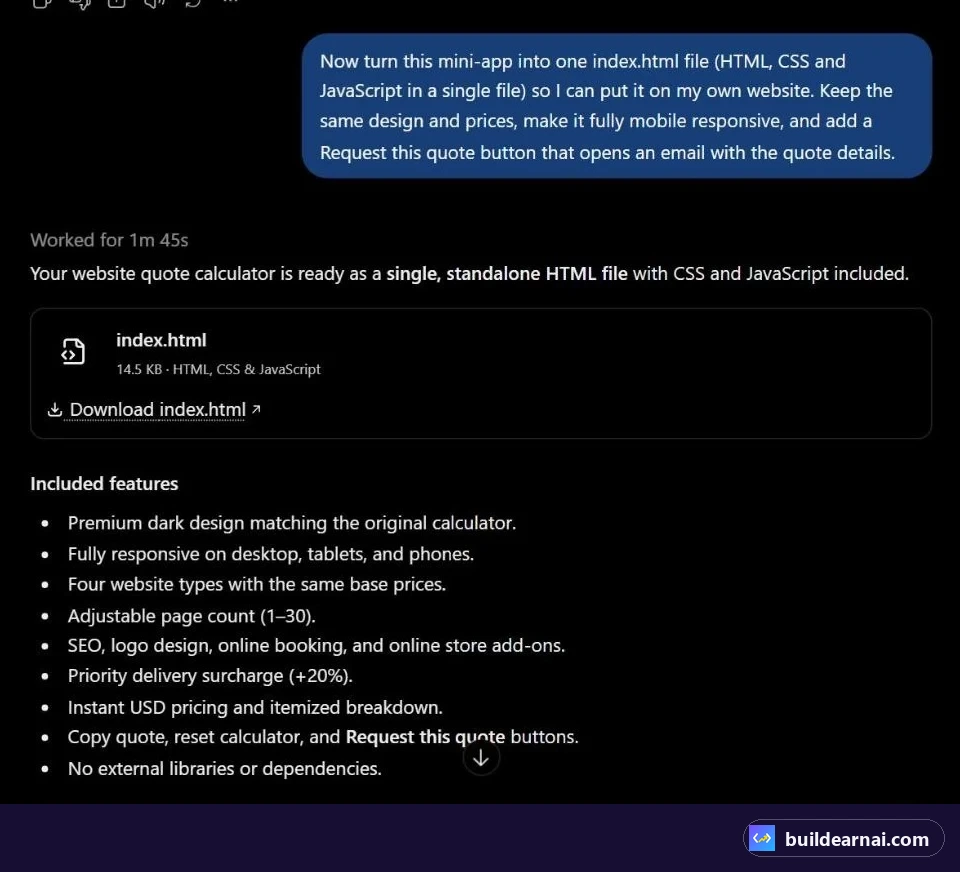
ChatGPT turned the mini app into one 14.5 KB index.html file. No libraries, nothing to build.
Claude Design. In Claude, Share → Export → HTML ("Standalone web page") downloads one file with the images and fonts embedded. Ours was about 2.5 MB because the photos were inside it. One catch: our first export had no mobile viewport tag, so the page looked zoomed out on phones. We asked Claude to add it before uploading.
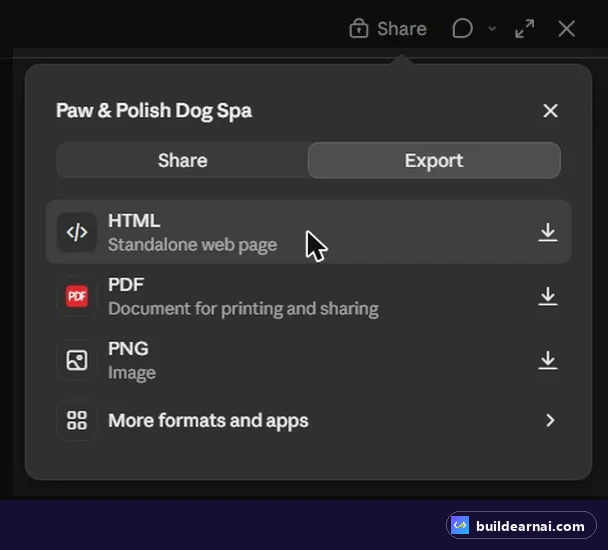
Claude Design: Export → HTML gives you one self-contained page.
Claude chat (Fable 5.1). For the football news site we asked Claude to "act as a senior UX designer and product lead, improve my brief first, then build it". The result was one HTML file with several pages inside it, animations and ad slots. You can see the whole build in our Claude Fable 5.1 football site video.
Step 2: Test it at phone width before you upload
Do not trust "fully responsive" until you check it. On the football site, the Home and Live pages scrolled sideways on a 390px phone by about 27 pixels: a decorative SVG inside the hero pushed the layout wider than the screen. We sent Claude a precise fix request (what is wrong, at which width, and how to confirm it), and it fixed the file and re-checked that the page width matched the screen.

Our fix request: the exact problem, the screen width, and how Claude should prove the fix.
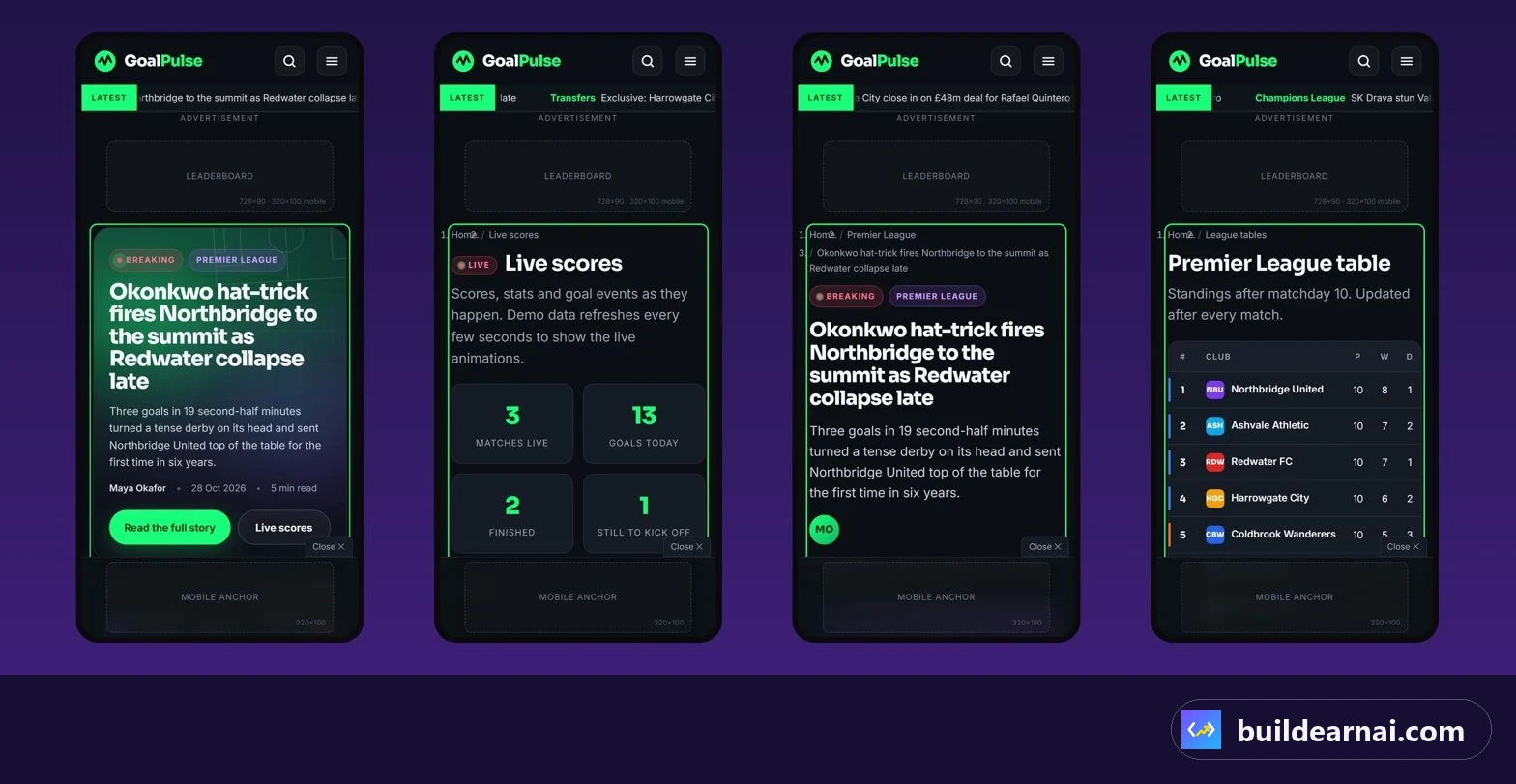
After the fix: Home, Live, an article and the league table checked at phone width.
A quick checklist before uploading:
- Open the file in your browser, press F12, and switch to a 390px phone view. Nothing should scroll sideways.
- Click every menu item and button. AI pages often have buttons that go nowhere.
- Search the file for placeholder text such as "Lorem", "example.com" or "Your Company".
- Check the
<title>and meta description, because they become your Google result. - Make sure there are no API keys in the JavaScript. Anything in a static file is public.
Step 3: Create a subdomain (or use your main domain)
If the site is the main website for a domain, upload to that domain's public_html. For demos, client previews and side projects we use subdomains, because they are free and each one gets its own folder. In Hostinger's hPanel: Domains → Subdomains, type the name, pick the domain, and click Create.
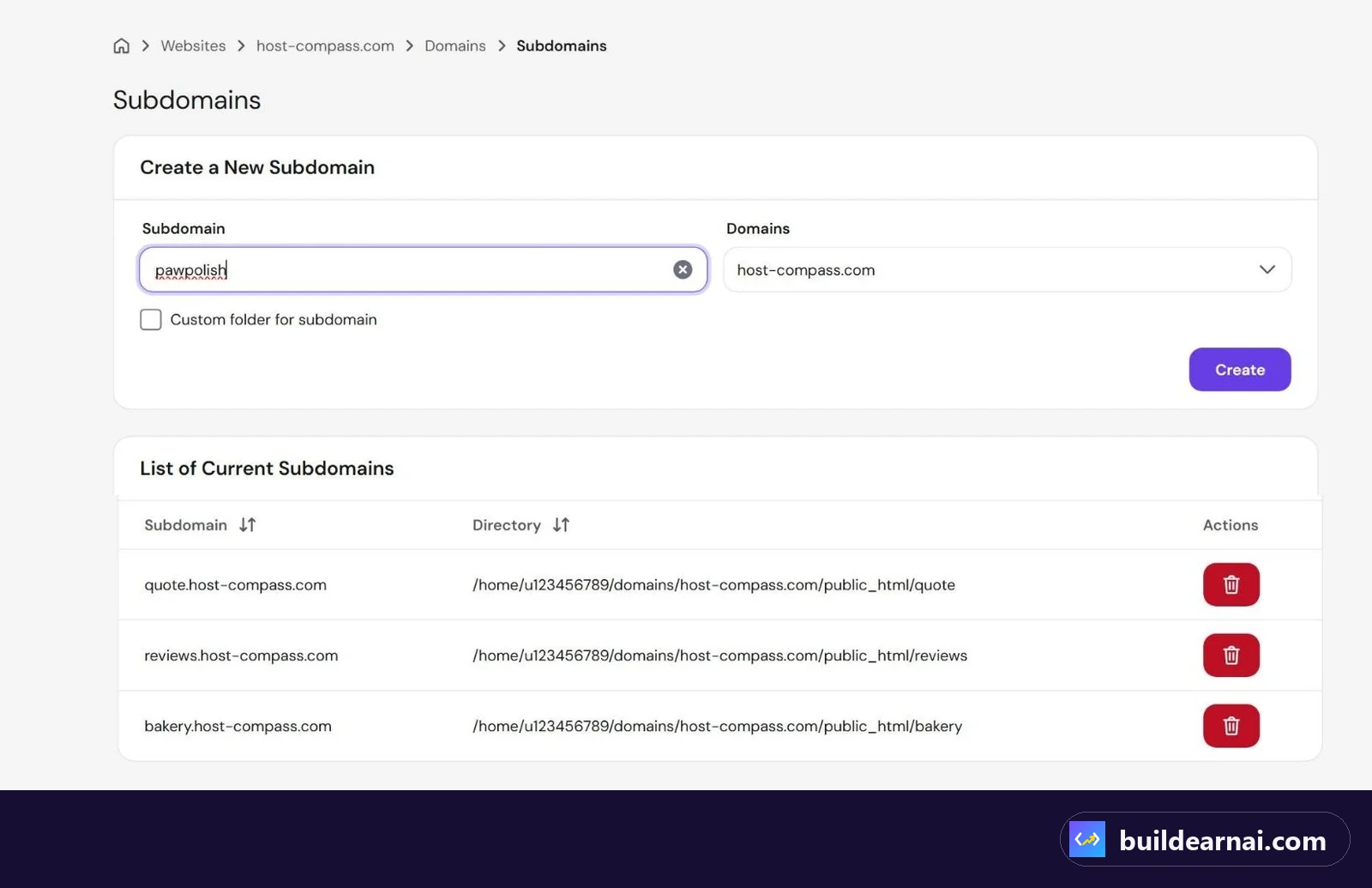
Creating the pawpolish subdomain. Its files go in public_html/pawpolish.
No hosting yet? Any shared plan with File Manager works; we use Hostinger, where subdomains and SSL are included. The subdomain received HTTPS automatically on our plan. If yours shows a certificate warning at first, give it a few minutes and check the SSL section in hPanel.
Step 4: Upload your HTML file to Hostinger with File Manager
- Open Files → File Manager and go to the subdomain folder (for us
public_html/pawpolish). - Click Upload → File and choose your
index.html. For a multi-file site, upload the folder and keep the same structure. - Delete Hostinger's placeholder
default.phpif it is still there, so it can never show instead of your page. - Make sure the file is named exactly
index.html(lowercase) and sits directly in the folder, not inside another sub-folder.
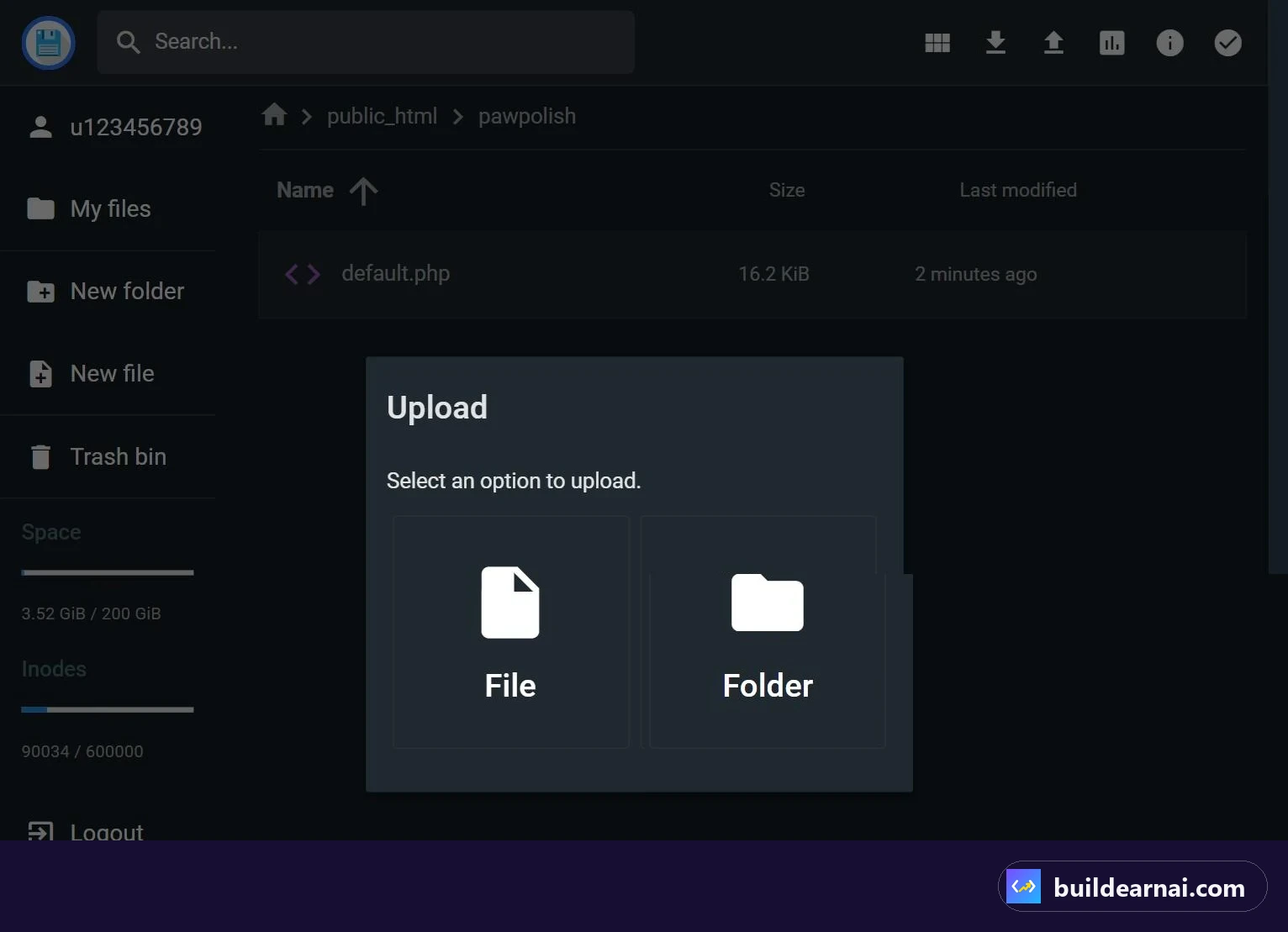
File Manager → Upload → File.
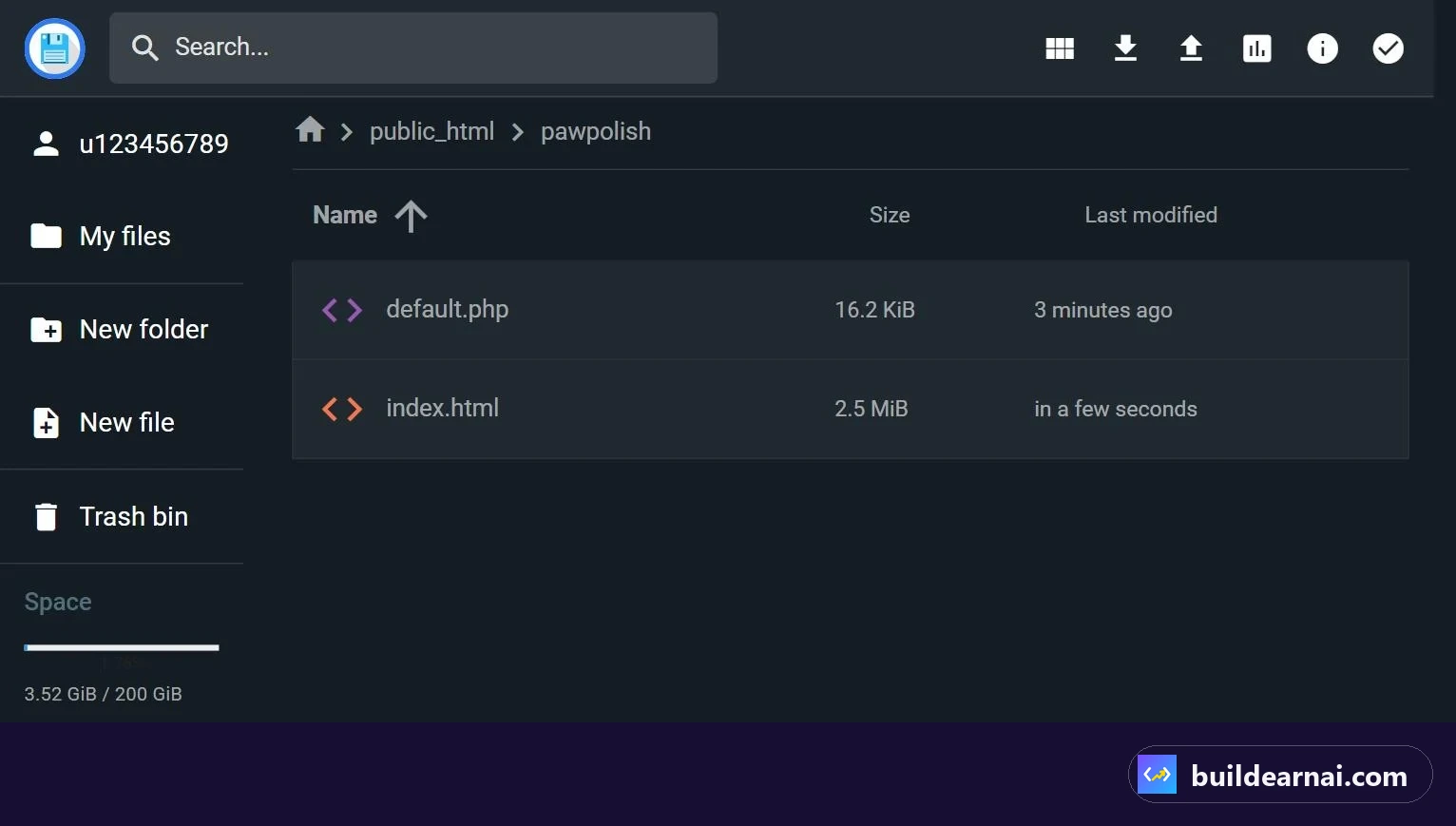
Our 2.5 MB index.html uploaded. That one file is the whole website.
Open the subdomain in your browser. That is it: no build, no server process, nothing to restart.

GoalPulse live on a subdomain of a shared hosting plan, running as one HTML file.
If your AI project is React or Vite (Lovable, Bolt, v0)
Tools that create a full project with a package.json need Node.js on your computer once, not on the server:
- Download or export the project and run
npm install, thennpm run build. - Upload the contents of the
distfolder (not the source code) topublic_htmlor your subdomain folder. - If the app has its own page routes (for example
/pricing), add a.htaccessfile next toindex.htmlso refreshing a page does not return a 404:
RewriteEngine On
RewriteCond %{REQUEST_FILENAME} !-f
RewriteCond %{REQUEST_FILENAME} !-d
RewriteRule . /index.html [L]
If the app talks to a hosted database service such as Supabase, your part can still be static. What does not work as static files is server code: Next.js server rendering, API routes, or anything that needs a process running all the time. Those need a Node.js plan or a VPS.
What a static AI site cannot do (and the fixes)
| Need | Problem with a static file | Simple fix |
|---|---|---|
| Contact form | HTML cannot send email on its own | A mailto: button (what ChatGPT did for us), a form service, or a small PHP script |
| Saving data (bookings, reviews) | No database | PHP + MySQL on the same plan: see how we hosted a PHP + MySQL app |
| Secret API keys | Everyone can read the JavaScript | Keep keys in server-side code, never in the page |
| Ads (AdSense) | Works, but Google wants real, original content | Replace AI sample articles with your own before applying |
What it costs
Static AI sites use very few server resources, so the cheapest shared plan is enough for one or two of them. We run all our demos on one Hostinger plan. At the time of writing (Black Friday pricing, checked November 7, 2026, US, 48-month term, before tax) Premium is $1.99/mo and Unlimited is $2.79/mo, or $2.51/mo with our coupon LEARN2EARN. Both renew at a higher price, which we break down in Hostinger renewal prices explained.
👉 See Hostinger's current shared hosting prices
Not sure which plan? If you will host sites for clients or several demos, read Hostinger Premium vs Unlimited, or compare total costs over four years with our hosting cost calculator.
Can you sell these sites?
Yes, and the hosting step is what turns an AI demo into something a client pays for. A file on your laptop is a prototype; a fast page on the client's own domain with HTTPS is a product. A common model for freelancers is a one-time build fee plus a small monthly fee for hosting, edits and checks. Our ChatGPT quote calculator (watch the build) used $450 for a landing page and $850 for a business site as sample prices; set yours for your market.
Planning to host several client sites? Read how we host multiple client websites on one plan. For one plan that holds them all, our Hostinger link plus the code LEARN2EARN is the setup we use ourselves.
FAQ
Can I host an AI website for free?
For testing, yes: free static hosts exist. For a client or a business, a paid plan with your own domain, email and backups is the professional option and usually costs a few dollars a month.
Why does my uploaded page show the hosting placeholder?
The file is in the wrong folder, is not named index.html, or the placeholder default.php is still there. Check the exact folder the domain or subdomain points to.
Does it work on a plan that already runs WordPress?
Yes. Any plan with File Manager or FTP can serve a static HTML file next to a WordPress site, as long as it is in its own folder or subdomain.
Do I need to know code?
No, but you need to check the result: phone layout, links, placeholder text and no secret keys. That checking is the part clients pay you for.
Put your AI website live on Hostinger →
Affiliate link: we may earn a commission at no extra cost to you. It does not change our tests or numbers.