 Build

Short answer: Yes, you can host many client websites on one shared hosting plan, as long as the plan allows enough websites, databases and backups. We run four live client-style projects (a quote calculator, a dog spa site, a news site and a PHP + MySQL app) on one Hostinger plan, each on its own subdomain and folder. For freelancers, the plan to look at is one with unlimited websites and daily backups, not the cheapest plan with a 3-site limit.
Updated November 7, 2026: Hostinger lowered its Black Friday price. The Hostinger numbers on this page are from our new cart check that day (US, before tax).
This guide shows our real setup, how to add each client site, what the plan limits mean in practice, and when a client should get their own hosting account instead.
Our setup: four projects, one plan
Every project you see below runs on the same shared hosting account. Each one is a subdomain of one domain while it is a demo; a paying client would point their own domain at it instead.

Four live projects, one shared plan. Each has its own folder, and the PHP app has its own database.

In hPanel every subdomain points to its own folder inside public_html.
| Project | Built with | Type | Needs a database? |
|---|---|---|---|
| Website quote calculator | ChatGPT | One HTML file | No |
| Paw & Polish dog spa | Claude Design | One HTML file (2.5 MB) | No |
| GoalPulse football news | Claude (Fable 5.1) | One HTML file | No |
| ReviewBoost review app | Gemini (free) | PHP + MySQL | Yes |
Static sites cost almost nothing in server resources. The app with a database is the one that uses a database slot, PHP workers and backups, which is why those limits matter more than storage.
How to add a new client website (two ways)
Option A: a subdomain (fastest, for previews and small projects)
- In hPanel open Domains → Subdomains.
- Type the name (for example
client-name), choose your domain and click Create. A folder such aspublic_html/client-nameis created for it. - Upload the client's files to that folder with File Manager, or install WordPress there.
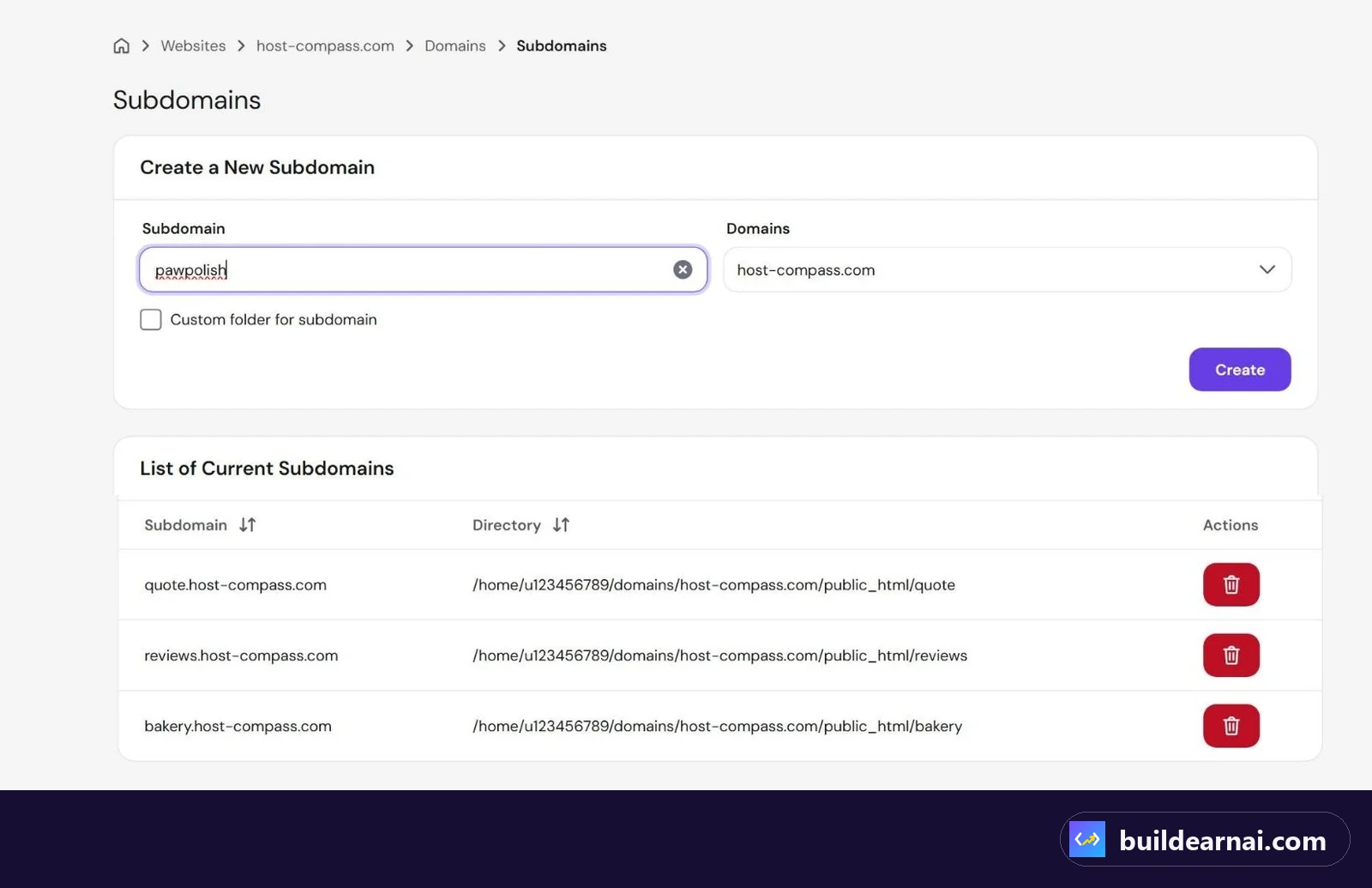
Creating a subdomain for a new project takes about a minute.
We use this for every demo before a client says yes. Send them client-name.yourdomain.com, collect feedback, and only then move it to their domain. You can watch the whole flow, from AI design to a live subdomain, in our Claude Design website video.
Option B: the client's own domain (for the live site)
- The client buys the domain in their own name (or you buy it for them and transfer it later). This avoids fights if you stop working together.
- In hPanel add it as a new website on your plan, then point the domain to your hosting (nameservers or DNS records the panel shows you).
- Upload the site or move the subdomain demo into the new website's folder, and check that SSL is active.
Every Hostinger shared plan includes a free domain for the first year, which is handy for your own demo domain (see the current plans). On a plan with a website limit, each client domain uses one slot. On a plan with unlimited websites, you only watch storage, databases and resources.
Which plan works for multiple client sites?
We compared Hostinger's shared plans on the official pricing page (checked October 26–30, 2026, US, 48-month term, before tax):
| Premium | Unlimited | |
|---|---|---|
| Websites | 3 | Unlimited (fair usage) |
| Databases | 10 | 150 |
| Backups | Weekly | Daily |
| Storage | 20 GB SSD | 50 GB NVMe |
| CPU / PHP workers | 1 / 40 | 2 / 60 |
| Price (48 months, Black Friday) | $1.99/mo ($95.52) | $2.79/mo ($133.92), $2.51/mo with LEARN2EARN ($120.53) |
| Renews at | $10.99/mo | $16.99/mo |
👉 Check both plans in Hostinger's cart
Our pick for freelancers: Unlimited. Three websites disappear fast once you add a staging copy, a demo and one client. Daily backups matter even more: if a client site breaks on Thursday, a weekly backup can be six days old. The full breakdown is in Hostinger Premium vs Unlimited.
👉 Get Hostinger Unlimited and add LEARN2EARN in the cart
When you have dozens of client sites and want more dedicated resources, Hostinger's Agency plans start at $29/mo on a 24-month term (renews at $49/mo) with room for 100 websites. That is a later step, not where you start.
The money side: what one plan can pay for
Many freelancers include hosting in a monthly care plan: hosting, backups, small edits and a monthly check. As an example only, if five small clients each pay $20 a month for that service, you collect $100 a month while the Unlimited plan costs $2.51 a month during the first term (and $16.99 a month after renewal). Your real prices depend on your market and how much work each client needs.
Two rules keep this honest and safe:
- Bill for the service (backups, updates, fixes, response time), not just "server space".
- Plan for the renewal price from day one, not only the first-term price. Our hosting cost calculator shows the four-year cost including renewal.
Risks of hosting many clients in one account
| Risk | What can happen | What we do |
|---|---|---|
| Shared resources | One busy or broken site can slow the others | Keep heavy stores or busy apps on their own plan |
| Security | An outdated plugin on one site is a door into the same account | Update WordPress and plugins every month; delete unused sites |
| Ownership | The client cannot reach their site if you disappear | Domain in the client's name; written handover notes |
| Backups | A weekly backup is too old for an active site | Daily backups (Unlimited) plus our own download before big changes |
| Renewal | The price jumps after the first term | Monthly fee covers the renewal price, not the promo price |
When a client should get their own hosting account
- An online store or bookings with real payments and personal data.
- A site with steady traffic that would slow your other projects.
- A client who wants full control, or a contract that requires it.
- Any project you might stop managing in the next year.
For those, help the client buy their own plan and give you access (for a managed WordPress option, see hosting.com), or compare options first in Hostinger vs hosting.com and our hosting reviews.
FAQ
Can I host client websites on shared hosting legally?
Hosting your own clients' sites as part of your service is common, but read your host's terms about reselling and fair usage. If you want to sell hosting as a separate product to many people, a reseller or agency plan is the cleaner option.
Do subdomains hurt SEO for a client?
Subdomains are fine for demos. For the live site, use the client's own domain so the authority builds for their brand.
How many WordPress sites can I run on Unlimited?
Websites are unlimited under the fair usage policy, but each WordPress site needs a database (150 included) and shares 50 GB storage and the plan's resources. Small brochure sites are light; stores are heavy.
Can I move a client to their own account later?
Yes. Back up the files and database, create the site on the new account, restore, and point the domain. It is easier when the client already owns the domain.
Get one plan for all your client sites (code LEARN2EARN) →
Affiliate link: we may earn a commission at no extra cost to you. It does not change our tests or numbers.