This AI assistant just answered a customer, recommended a fifteen hundred dollar package, and asked for their email. All by itself, inside Telegram. I built it with n8n on my own VPS, and you can sell it to any business. Hey, I'm Adam, and welcome to Build and Earn AI. Let me show you the result first, and then exactly how to build it, step by step.
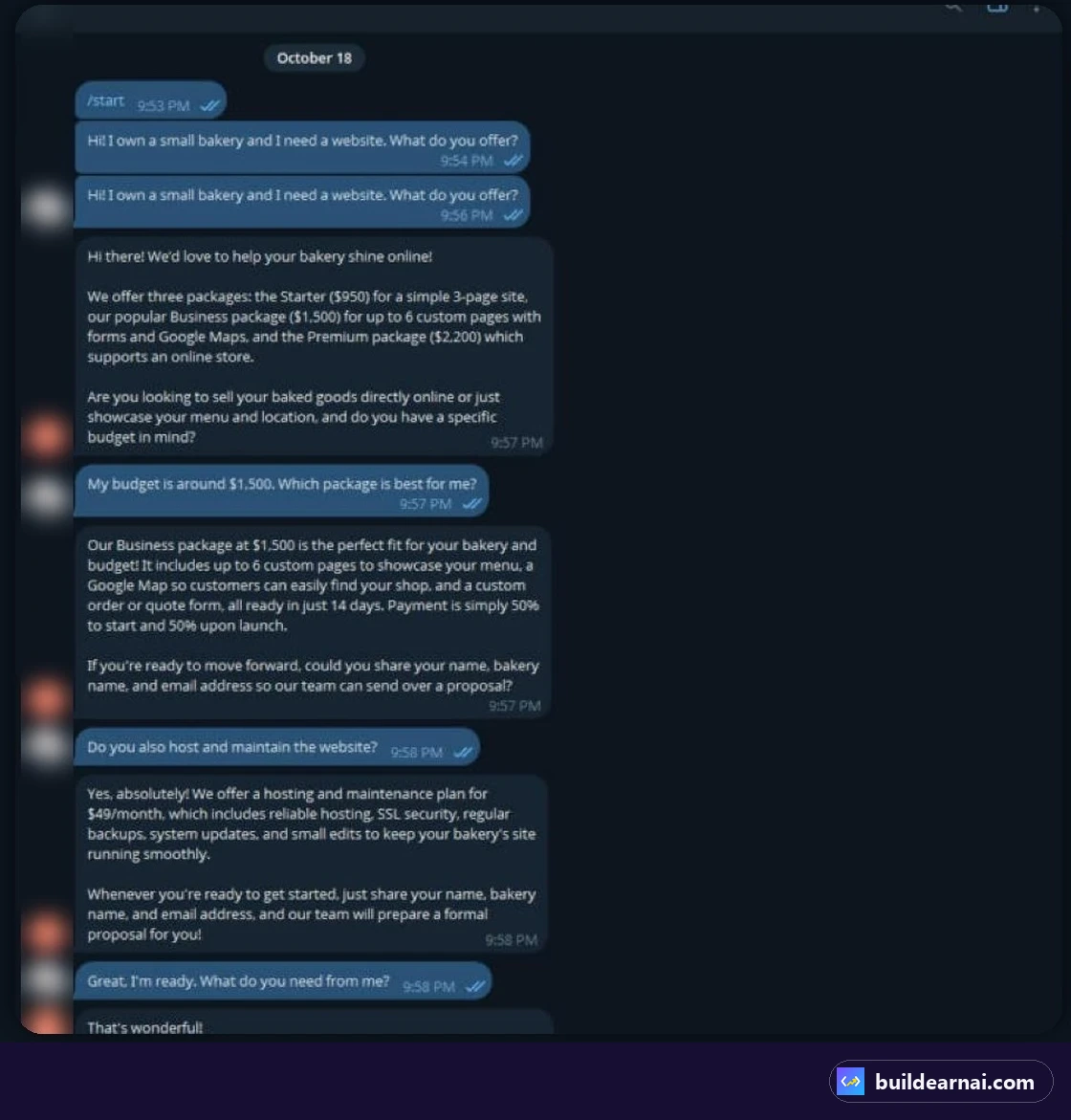
Here's the real conversation. A bakery owner asks what we offer. The bot lists three packages, Starter, Business and Premium, and asks about the budget. When the customer says fifteen hundred dollars, it recommends the Business package, explains the timeline and the payment, offers the forty nine dollar monthly hosting plan, and asks for the customer's name and email.
That's a lead, captured automatically. And this is how you make money with it. Every small business answers the same questions every day. You can set up a bot like this for a client for one hundred fifty to three hundred dollars, and then charge thirty to fifty dollars a month to keep it running.
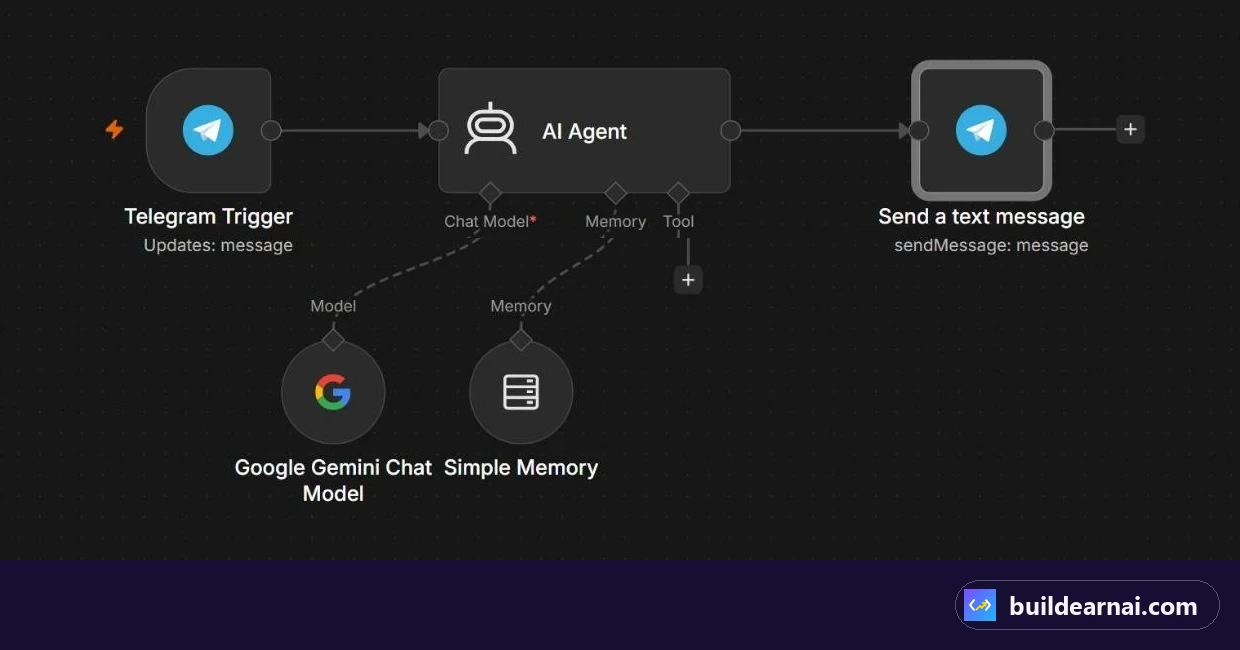
One VPS can run bots for many clients. The whole bot is just five pieces in n8n: a Telegram trigger, an AI agent, a Gemini model, memory, and a reply. Let's build it. First, you need a VPS. I use Hostinger, and the link is in the description. Open VPS hosting and click Choose plan.
KVM 1 is enough to start: one CPU core, four gigabytes of RAM and fifty gigabytes of NVMe storage, for six forty nine a month on a two year plan. If you plan to run many bots, KVM 2 gives you double. In the cart, choose the period. Twenty four months gives the best price, and you also get a free domain for one year.
Notice the renewal price, eleven ninety nine a month, so you know what to expect. Choose a server location close to your customers. I picked Frankfurt, in Germany. For the operating system I'll pick Ubuntu here. Don't worry, after buying we can install n8n in one click. Now click Have a coupon code, and type LEARN2EARN.
The price drops to five eighty four a month. Taxes depend on your country. Then click Continue, create your account and complete the payment. Quick question. Would you build this bot for your own business, or sell it to clients? Comment 1 for my business, or 2 for clients. After you buy, Hostinger opens the VPS setup.
Confirm the server location. I'm keeping Frankfurt. Now choose what to install. Search for n8n, and you'll see a few versions. Pick the popular n8n, installed using Docker, and click Select. Set your timezone, it's used for scheduled workflows, and click Deploy. Hostinger installs everything for you. For me it took about two minutes. When it's done, you land in Docker Manager, and n8n is running.
Click Open. Create your n8n owner account with your email and a strong password. This is your own private n8n, on your own server, with no monthly n8n fee. Now click Build a workflow, and give it a name. Add the first step. Search for Telegram, and choose On message. This starts the workflow every time someone messages your bot.
Click Connect to Telegram. It asks for an access token. To get one, open Telegram, message BotFather, send slash new bot, choose a name and a username, and copy the token it gives you. Paste it here and save. Next, click the plus and add an AI Agent. Set the prompt to Define below, and use the text of the Telegram message.
Then add a system message. This is the most important part. It tells the AI who it works for, the packages and the prices, and the rules: answer short, recommend a package, ask for the customer's details, and never invent prices. Now the brain. Under Chat Model, add the Google Gemini Chat Model. Click Connect, and paste a free API key from Google AI Studio.
Then pick the model. Important: Gemini two point five Flash is no longer available to new users, so I chose Gemini three point eight Flash. Add Simple Memory, and use the Telegram chat ID as the key. Now the bot remembers each customer's conversation separately. Finally, add Telegram, Send a text message. The chat ID comes from the trigger, the text is the AI output, and I turned off the n8n attribution, so the replies look professional.
Save, and click Publish. Your bot is now live, twenty four seven, on your own VPS. Every message shows up in Executions. Green means it worked. If something fails, open it, and you'll see exactly why. A few honest notes. The Gemini free tier has rate limits, so for a busy client, use a paid key.
Always test the bot before you hand it over. And keep your token and your API key private. The VPS link and the coupon are in the description. Subscribe for a new AI tutorial every week. And tell me in the comments: your own business, or clients? 1 or 2?
 Build