 Build
Short answer: Hostinger gives you 30 days from the payment date to cancel most products for a refund, including web hosting and KVM VPS plans. But some things are never refunded: the free domain that comes with a 12, 24 or 48-month plan, domain renewals, privacy protection and all AI credits. VPS refunds have one extra rule, and how you paid matters too. To get your money back you use the Refund button in Billing → Payment History; to just stop paying, you cancel the subscription (turn off auto-renewal). Here is the full list, checked on Hostinger's refund policy page (last revised October 29, 2026), and what to do before you buy.
🛡️ Buy with the 30-day window in mind
Hostinger Web Hosting Unlimited: unlimited websites, free domain for the first year, daily backups. Use code LEARN2EARN at checkout for an extra discount.
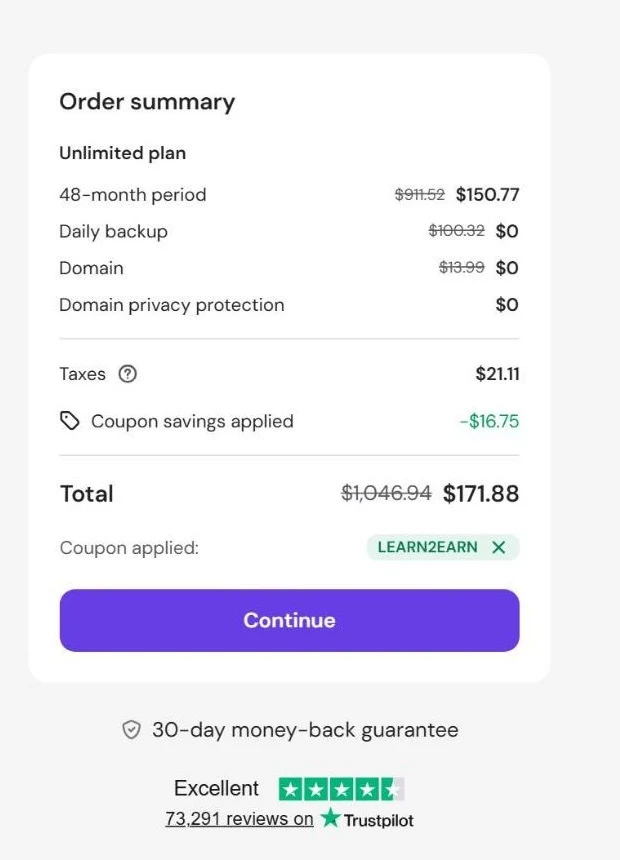
Our real Hostinger cart: the 30-day money-back guarantee is shown right under the Continue button.
How long is Hostinger's money-back period?
30 days from the date of the transaction. Hostinger counts a renewal as a new transaction, so a renewal payment also gets its own 30-day window under the standard terms. The policy does not limit refunds to your first purchase, but it does say Hostinger can refuse refunds that look like abuse, such as refunding the same service again and again.
What Hostinger refunds
Under the standard 30-day terms, the policy lists these as refundable:
- Web hosting plans (except the first payment after a free trial)
- KVM VPS and Game Panel VPS plans (not upgrades)
- Hostinger Email and Titan Email, SSL certificates, daily backups, Cloudflare, Priority Support
- Hostinger AI Builder, WordPress add-ons, Dark Web Monitor
That covers what most people buy: a web hosting plan or a KVM VPS, both inside the 30-day window.
What Hostinger does NOT refund
| Not refundable | What it means for you |
|---|---|
| Free domain from a 12, 24 or 48-month plan | If you cancel the plan, the domain is not refunded or swapped. If a refund is made, Hostinger may take the domain's normal price off it, and you keep using the domain for its term. |
| Domain renewals, successful domain transfers, privacy protection | Renew a domain only when you are sure. |
| AI Builder credits, AI credits, Hostinger Credits | Credits you buy are final. |
| VPS licenses and VPS upgrades | The plan is refundable, the upgrade is not. |
| Google Workspace email, SEO Toolkit, website cleanup, paid support services, GPU hosting | Treat these as final purchases. |
| Payments made with cryptocurrency | No refunds at all. |
| Anything suspended for abuse or terms violations | No refund. |
Special rules you should know
VPS refunds
A VPS plan is refundable within 30 days of its payment, but only if more than 180 days have passed since your last refund of any other VPS plan. In plain words: one VPS refund every six months. Not sure which VPS size you need? Read Hostinger VPS prices, KVM 1 to KVM 8 before you buy.
New domains bought on their own
A new domain registration is refundable only if you start the refund within 96 hours (and at least 24 hours after your last domain refund). Some country domains, such as .ai, .de, .uk, .us and .com.au, cannot be refunded at all.
AI Builder Agentic (formerly Horizons)
Refundable within 30 days only if you used fewer than 30 messages (AI credits).
How you paid matters
Refunds go back to the original payment method by default, or to your Hostinger Balance if you choose it. A refund to the balance is final. Payments made with Multibanco (Portugal), GCash (Philippines) and Fawry (Egypt) can only be refunded to the Hostinger Balance, not back to the original source.
How to get a refund from Hostinger (step by step)
You don't need to chat with anyone for most refunds: the button is in your dashboard. These are the steps from Hostinger's own help center, checked on November 9, 2026:
- Back up your data first. The service is cancelled the moment you submit the request, and its files, databases and emails are deleted permanently. Sites made with the Hostinger AI Builder can't be downloaded as a backup, so save your text and images by hand (or export the content to WordPress).
- Open Billing → Payment History. In the Hostinger dashboard, click the profile icon in the top-right corner, then Billing → Payment History. It lists your payments from the last 30 days.
- Click Refund next to the payment. If there is no Refund button, that payment isn't refundable under the policy (for example, it's older than 30 days or it's a domain renewal).
- Confirm the services, tick the box that says you understand the data will be lost, click Next and choose a reason.
- Choose where the money goes: your Hostinger Balance or your original payment method (see the table below).
- Submit the request. You get an email confirmation, and you can follow it in Billing → Refund History.
| Refund method | How fast | Good to know |
|---|---|---|
| Hostinger Balance | Instant | Only usable for Hostinger purchases, and it's final: it can't be moved to your card later. |
| Original payment method | A few hours to several business days | Depends on your bank or payment provider. If your method can't receive refunds, Hostinger asks for another one. |
If the Refund button is there but you are unsure, ask the 24/7 live chat before you click: a refund can't be undone. If you change your mind afterwards, you have to buy a new plan and restore your backups. And contact support before you open a chargeback with your bank, because a chargeback can close your account.
How to cancel Hostinger without a refund
Past the 30 days, or if you just want to stop paying after the current term, you don't delete anything: you turn off auto-renewal.
- Go to Billing → Subscriptions in the Hostinger dashboard.
- Find the service (hosting, VPS, email or domain) and click Manage.
- Click Cancel subscription and confirm. This turns off auto-renewal.
The service keeps working until its expiry date, then it's cancelled and deleted automatically. There is no delete button for a service in the dashboard, and your account itself can't be deleted while it has active services. Cancelling a hosting plan that came with a free email trial cancels the email trial too.
Before you buy: 4 checks that protect your money
- Know the total, not just the monthly price. The low price covers the first term. See what each plan renews at in Hostinger renewal prices explained, and compare hosts over 4 years with our true hosting cost calculator.
- Pick the right plan the first time. Most people choose between Premium and Unlimited: here is every difference and the 4-year cost.
- Remember the free domain stays non-refundable. Choose its name carefully. Here is how the Hostinger free domain works.
- Test in the first days. Build your site in the first week, so you can decide well inside the 30 days.
Ready to try it with the 30-day window? Open Hostinger's plans and add the code LEARN2EARN in the cart.
📖 Read the full review first
Real cart screenshots, renewal prices, pros and cons, and who Hostinger is not for: our Hostinger review. Or compare it with hosting.com and FastComet.
Sources: Hostinger Refund Policy (official). Steps: How to get a refund at Hostinger and How to cancel a Hostinger service (Hostinger help center, checked November 9, 2026).
FAQ
Can I get a refund after cancelling my subscription?
Cancelling the subscription only turns off auto-renewal, it doesn't send money back. To get a refund, request it in Billing → Payment History within 30 days of the payment, for a refundable product. A hosting renewal starts its own 30-day window.
How do I submit a refund request?
In the Hostinger dashboard go to Billing → Payment History, click Refund next to the payment, confirm the services, choose Hostinger Balance or your original payment method and submit. If there is no Refund button, that payment isn't refundable.
How long does a Hostinger refund take?
A refund to your Hostinger Balance is instant. A refund to your card or other original payment method takes from a few hours to several business days, depending on the payment provider.
What if there is no Refund button?
Then that payment isn't refundable under the policy, usually because it is older than 30 days or it is a non-refundable item such as a domain renewal. You can still stop future payments by cancelling the subscription (turning off auto-renewal).
Does Hostinger delete my website after a refund?
Yes. As soon as the refund is processed the service is terminated and its files, databases and emails are deleted. Download your backups before you request it.
Does Hostinger have phone support?
We found no support phone number on Hostinger's contact page. Support is 24/7 live chat (see Hostinger's downsides).
Does Hostinger really give a 30-day money-back guarantee?
Yes, for most products, counted from the payment date. Exceptions include the free domain from a long plan, domain renewals, privacy protection, AI credits and crypto payments.
Can I get a refund on a Hostinger VPS?
Yes, within 30 days of the VPS payment, if more than 180 days have passed since your last refund of another VPS plan. VPS upgrades and VPS licenses are not refundable.
Is the Hostinger free domain refundable?
No. A free domain from a 12, 24 or 48-month plan is not refundable and cannot be exchanged. If a refund happens, Hostinger may deduct the domain's regular price, and you can keep using the domain for its term.
Can I get a refund on a Hostinger renewal?
Hosting renewals count as a new transaction, so the standard 30-day terms apply to them. Domain renewals are not refundable.
I paid with Fawry in Egypt. Where does my refund go?
To your Hostinger Balance only, not back to Fawry. The same applies to Multibanco and GCash.
Checked on November 3, 2026 against Hostinger's refund policy (last revised October 29, 2026). Policies change, so check the current page before you buy.